

If a network is like a building, business cards are its bricks. Almost every professional handshake still comes with a card exchange, even after the shift to a largely digital world. In fact, business cards are one of the few analog habits that have survived this transition, keeping professional connections alive with an old-world human charm.
However, as the network expands, managing physical cards within a digital workflow becomes tedious. Even more tiring is manually saving those contacts to phones or email accounts, and that’s how many valuable connections slip through the cracks.
Business card scanner apps exist to close this gap. They help move offline interactions into an organized digital system without adding effort. In this blog, we’ll explore the best business card scanner apps and how to select one that aligns with your networking style.
Key Takeaways:
|
The basics of a business card scanner app:
What does a card scanner app do?
At the simplest level, a business card scanner app takes a photo of a card and turns it into a digital contact, saving the name, number, email, and company. That part is straightforward.
Why use a card scanner app in the first place?
Most people forget to save the cards because the effort to save details from a growing card collection, organize them, and revisit that information feels higher than the perceived benefit at the moment. Scanner apps remove that friction.
Who needs a business card scanner app?
This is especially useful for founders, consultants, freelancers, and business owners whose work grows through networking rather than cold outreach. If your networking involves events, conferences, or casual catch-ups, scanner apps support continuity and recall.
Best business card scanner apps for professionals and founders in 2026
Discover the top business card scanner apps professionals and founders are using in 2026. These tools help you instantly scan, organize, and manage contacts from physical cards without manual data entry.
CamCard
CamCard takes a depth-first approach to business card scanning. The initial scan might not get everything right, but its proofreading feature typically corrects errors within minutes. Once the data is cleaned, the app focuses on maintaining a well-enriched contact profile rather than just a contact capture. Post-scan proofreading and deduplication are its outstanding features.
Regards
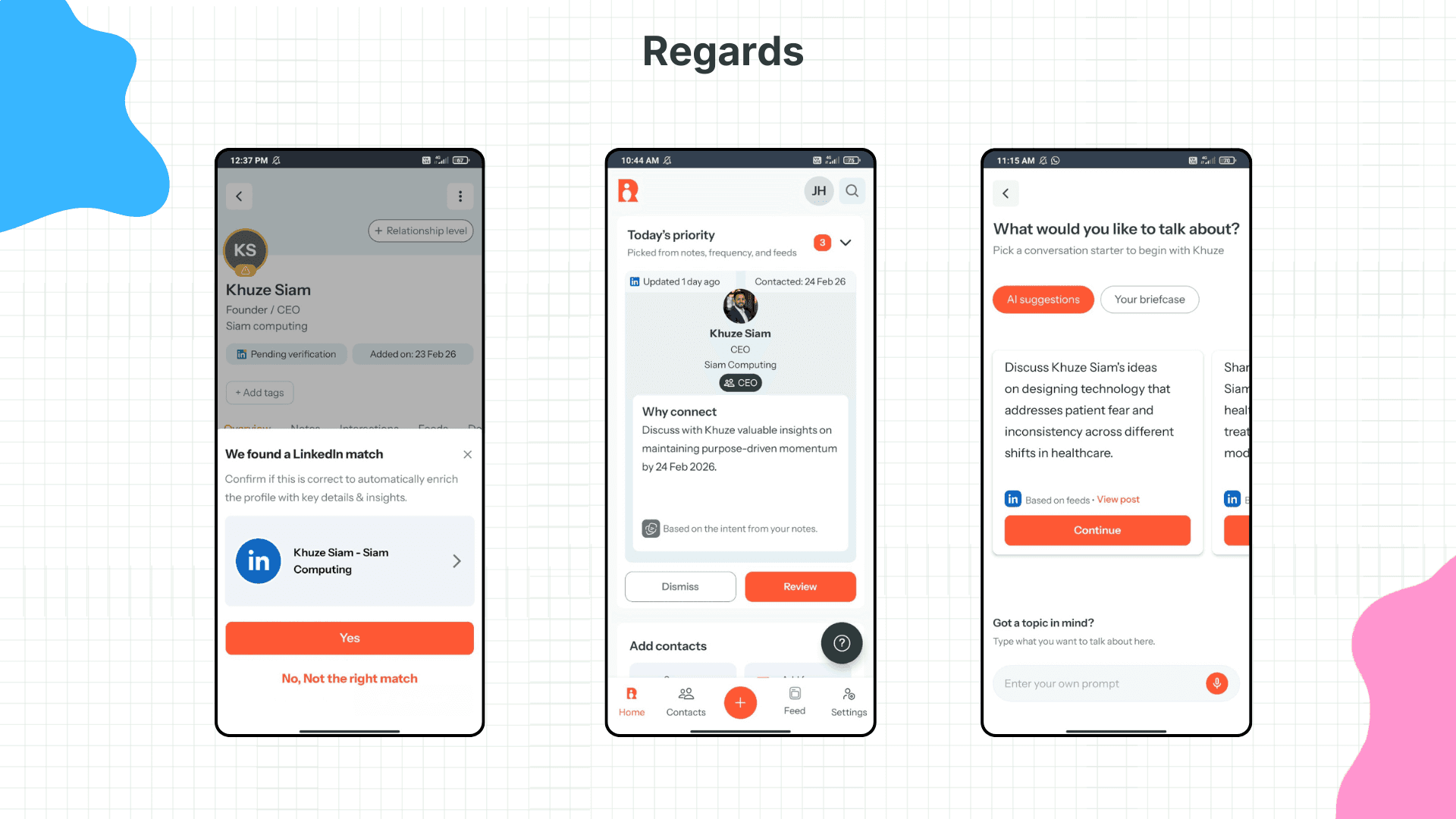
Regards is an exceptional card scanner app that not only handles the basics of business card scanning but also helps users stay in touch with captured details in a meaningful, natural, and practical way. The features that make Regards effective are:
AI-powered capture and accurate extraction of essential details
Smart tags that automatically categorize scanned contacts
Contextual, natural-language search across scanned contacts
LinkedIn sync, smart follow-up prompts, and custom reminder frequencies
Haystack
Haystack is a business card scanner app with a strong emphasis on digital cards and visual presentation. It scans physical cards, fills in missing details using web data, and converts them into shareable digital profiles. While it lacks advanced integrations or contact grouping, Haystack works well as a free, lightweight, and ad-free option.
ScanBizCards
ScanBizCards is designed specifically for event and conference use, where large volumes of contacts need to be captured quickly and pushed into CRMs without friction. It enables on-ground lead capture through business card and badge scanning. To support this workflow, the app focuses on a few core capabilities:
Event-focused OCR for business cards and badges
Optional human transcription for improved accuracy
Direct CRM integrations with real-time exports
API access for connecting captured leads to internal systems
ABBYY Business Card Reader
ABBYY Business Card Reader is known for accurately reading complex layouts and multilingual cards. It supports 25 languages and is commonly used by international sales and operations teams that deal with multiple regions. The app’s functionality centres on high-accuracy OCR and structured exports suitable for enterprise systems.
Feature checklist for choosing the best card scanning app
Most card scanning apps can capture details, but the real differences appear in how those contacts are organized, searched, and followed up over time. Use the checklist below to quickly assess what an app actually offers beyond basic scanning:
For scanning efficiency:
OCR accuracy on complex card designs
Post-scan enhancement and proofreading
Conference badge scanning support
For enhanced contact management:
Automatic contact deduplication
CRM and export integrations
Contact and company sync with phone and social profiles
For better relationship-building with scanned contacts:
Follow-up reminders and relationship nudges
Smart tagging or categorization
Contextual and natural-language search
Custom reminder frequencies with smart prompts
Conclusion
In the end, scanning a business card is just the tip of the iceberg. Underneath that simple process is a huge, immersive mountain of ice called ‘relationship building and professional networking for sustainable growth.’
If you only focus on the scan, you're only seeing the tip. The real value lies in the long-term trust you build after the card is in your phone. So, when you're looking for a business card scanner app, choose one that doesn't just support the tip, but supports the iceberg as a whole.

Why we built Regards
I’m bad at staying in touch. Not because I don’t value people. Its a lot of work, and I didn’t have a system. This started as my fix. A quiet assistant that helped me nurture relationships thoughtfully. When people noticed the difference and asked what I was doing, it slowly evolved into a product. And the love has been incredible. Regards, Khuze

Frequently Asked Questions
While using a card scanner app, is snapping a photo enough, or do I still need to review scanned contacts?
Snapping a photo gets the data in, but it isn’t the only step. Card scanners can misread names, job titles, or company names, especially on cards with typographic logos. A quick check right after scanning lets you fix obvious errors, merge duplicates, and add a note for easy future recall.
What should I prioritize when choosing a card scanner app for long-term use?
For long-term use, look beyond non-negotiables like speed and accuracy. Focus on how easily you can organize contacts, search them later, and keep them updated. Features like smart tags, clean deduplication, contact syncing, and follow-up reminders tend to matter more over time.
How do I use business card scanner apps for events and conferences?
Choose an app with reliable OCR and contact sync, and set up the app well before the event. Scan cards or badges soon after meeting someone, then quickly run an accuracy check and add a short note or tag. Scan in good lighting with the card placed flat to improve accuracy. After the event, organize your contacts and follow up within 24–48 hours while the interaction is still fresh.
How do I keep track of scanned contacts after they’re saved?
To keep track of scanned contacts over time, use tags or categories to group people and rely on search instead of scrolling. Apps like Regards make tracking easier through smart tags and natural-language search.