

Most professionals have more connections than they can keep track of — LinkedIn profiles they barely remember adding, business cards from events that ended up in a drawer, a mental list of people to follow up with that never gets shorter. A networking CRM fixes exactly that. It gives you a system for your relationships, not just a place to store contact details.
Key Takeaways
|
What Does 'Networking CRM' Actually Mean?
CRM stands for Customer Relationship Manager. But most CRMs were designed for sales teams moving deals through a pipeline. A networking CRM does something different — it is built for professionals who depend on long-term relationships for their livelihood: the financial advisor whose clients need to refer their friends, the headhunter who needs hiring managers to think of them first, the agency owner who wins most work through word of mouth.
The core jobs of a networking CRM are: tracking who is in your network and what you know about them, reminding you to reach out before relationships go cold, surfacing conversation starters so you always know what to say, and prioritising who deserves your attention right now.
Think of it less as a pipeline and more as a garden. You are tending relationships, not closing deals.
Why Your Current System Is Failing You
Most professionals cobble together LinkedIn, phone contacts, a spreadsheet, and memory. This works — until it does not. The spreadsheet collects dust. LinkedIn shows someone changed jobs three weeks after the fact. Your mental list of people to follow up with is a list of intentions, not actions.
The problem is not that you do not care about your network. It is that you do not have a system that prompts you to act on it consistently. Networking without a system feels like exercise without a schedule — you mean to do it, and then you do not.
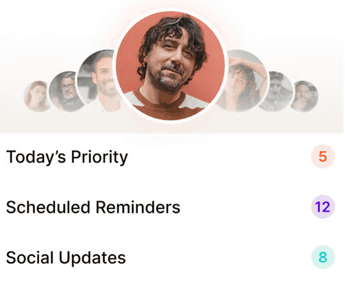
A networking CRM adds structure without adding friction. The best ones are proactive: they tell you who to reach out to before you remember to. That shift — from reactive to proactive — is the whole game.
How a Networking CRM Is Different From a Sales CRM
A sales CRM tracks leads, deal stages, pipeline value, and close rates. It is built for teams, requires regular data entry, and is most useful when you are managing a volume of inbound and outbound prospects.
A networking CRM tracks relationships, context, touchpoints, and timing. It is built for an individual or small team. It is proactive about who you should contact next. It is most useful when your business grows through referrals, introductions, and staying top of mind.
A simple test: if your best client referred someone to you tomorrow, did that referral happen because of a sales process or a relationship? Networking CRMs are built for the world where it is almost always the latter. The two tools can coexist — your sales CRM handles the deal, your networking CRM handles the relationship that created it.
Key Features Worth Looking For
Not every tool marketed as a networking CRM earns the name. Contact context matters — can you capture how you met, what they care about, what you have talked about? This is what makes follow-ups feel personal rather than automated.
Proactive reminders are non-negotiable. The tool should tell you who to reach out to before you remember to. A passive address book is not a CRM — it is a phonebook. Equally important: conversation starters. The best tools surface reasons to reach out, whether that is a LinkedIn post, a job change, a work anniversary, or a piece of news relevant to what they do.
Mobile-first design matters more than most people think. Networking happens everywhere — at events, over coffee, between meetings. If the tool only works at a desktop, it will not work for you.

Who Actually Needs One?
If most of your clients come from referrals, warm introductions, or someone knowing someone — you need one. The question is not whether your network matters. For most professional services people, it is the entire business. The question is whether you have a system to manage it.
That includes headhunters, financial advisors, real estate agents, management consultants, PR and marketing agency owners, lawyers in private practice, and any solo or small-firm professional where the next client comes from a relationship, not a campaign.
Cold leads convert at 1–3%. Warm referrals convert at 10–30%, often faster, and cost you nothing in acquisition spend. A networking CRM is how you make sure those warm leads keep coming.

Why we built Regards
I’m bad at staying in touch. Not because I don’t value people. Its a lot of work, and I didn’t have a system. This started as my fix. A quiet assistant that helped me nurture relationships thoughtfully. When people noticed the difference and asked what I was doing, it slowly evolved into a product. And the love has been incredible. Regards, Khuze

Frequently Asked Questions
What is the difference between a networking CRM and a regular CRM?
A regular CRM tracks deals and sales pipeline. A networking CRM tracks relationships, touchpoints, and timing — it tells you who to reach out to and why, before opportunities go cold.
Do I need a networking CRM if I already use LinkedIn?
LinkedIn is a directory, not a system. It does not remind you to follow up, surface context about your last conversation, or prioritise who deserves your attention this week. A networking CRM fills all of those gaps.
Is a networking CRM only for salespeople?
Not at all. It is most valuable for anyone who depends on relationships for revenue — consultants, advisors, recruiters, agents, and small business owners. You do not need to be in 'sales' to benefit.
Will I have to do a lot of data entry?
Good networking CRMs minimise manual input. Regards, for example, lets you scan a business card, leave a voice note, and have the AI extract follow-up details automatically.
Can I use a networking CRM alongside my sales CRM?
Yes, and many professionals do. The networking CRM manages relationship context and warm touch cadence. The sales CRM takes over once a warm lead becomes an active opportunity.
Is Regards a networking CRM?
Yes. Regards is built specifically to help professionals stay connected with their network — it surfaces who to contact, suggests conversation starters from LinkedIn activity, and helps you build a consistent outreach habit.


