Cold outreach is officially dead in 2026. This is year of meeting people in-person and building relationships and connections. With in-person meetings, what is also making a comeback is business cards.
Here’s a practical guide to the best business card scanner apps in 2026. We tell you what to actually look for, what to ignore, and why scanning is only half the job.
Key Takeaways
|
Why business cards are relevant in 2026
A card is still the fastest, least awkward way to exchange details, especially when you’re meeting a lot of people.
95%of professionals say face-to-face communication is vital for long-term business relationships. Source: HubSpot |
What makes a good business card scanner app in 2026
The bar for a business card scanner app is much higher than it was even a few years ago. Here’s what actually matters now.
1. Accurate OCR, even on bad cards
The best apps in 2026 handle glare, weird fonts, foreign scripts, embossed text, and dark backgrounds. If you have to correct fields on every card you scan, you’ll stop scanning.
2. Smart field extraction
Good apps don’t just read the text — they understand which line is the name, the title, the company, and the email. If the card has a Twitter handle or a WhatsApp number, the app should put them in the right field automatically.
3. Instant save, no friction
Scan, review, save — in under 10 seconds. If a scanner app takes a minute per card, you won’t use it at a conference where you meet 20 people in an hour.
4. Voice notes and quick context
After scanning a card, you leave a 20-second voice note: “met at the AI roundtable, they’re working on onboarding flows, follow up next week with the Figma resource.”
5. Follow up AI Assistant:
This is where 2026 starts getting more fun. Now, card scanner apps can not just transcribe your voice note, it can extract follow ups & details and set the reminder.

6. Integrations
Even better if the apps push the context to your phone contacts and/or your CRM. Or one better, act as an upgraded contact management app.
7. Privacy
Your contacts are your own. Bad apps (often free) use your contacts data for advertising, selling lists and spamming them. Please check the privacy policy before downloading.
The scanning apps you’ve heard of
These are the familiar, widely used business card scanning tools that most people come across first.
CamCard
One of the originals. Strong OCR, good language support, cloud sync. Feels a bit dated in its interface and heavier on friction than newer apps. Best if you need a simple, well-known name.
HiHello
A newer entrant focused on digital and paper business cards. Clean interface, good integrations. More of a digital card creator than a deep relationship tool.
ABBYY Business Card Reader
Very strong text recognition and a broad language base. Again, interface feels older, and the app is narrowly focused on scanning only — no relationship management layer.
Regards
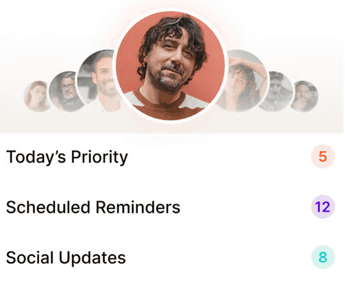
A personal CRM with a fast, AI-powered card scanner baked in. Built for one person managing their own professional network. Scan the card, leave a voice note, and the app extracts the contact, tags them, logs the meeting, and sets a follow-up. The scanner isn’t a feature — it’s the starting point of a relationship system.
Sansan
Popular in Japan and parts of APAC. Excellent accuracy, good enterprise integrations, but built primarily for teams, not individuals.
Adobe Scan / Microsoft Lens
General document scanners that do a decent job on cards in a pinch. Lack smart extraction, batch scanning, and any relationship follow-through.
Why a scanner alone isn’t enough
Here’s the uncomfortable truth about pure scanner apps. Scanning gets the data into your phone. That doesn’t mean you’ll stay in touch.
A scanned business card that turns into a contact row with no context, no cadence, and no reminder is barely different from a card in a drawer. It is not organization. It’s just the same problem.
70%of a conversation is forgotten within 24 hours. Source: Research on human recall |
If you don’t capture context inside the first day and set up a follow-up cadence, the scan itself rarely turns into a relationship. The best apps in 2026 solve both problems: fast capture and durable follow-through.
The 24-hour rule, with a scanner
Every networking expert — Ferrazzi, Carnegie, Misner — converges on one practice: follow up within 24 hours of meeting someone. It’s the simplest possible trust signal.
The 24-hour card-to-conversation workflow Scan the card in under 10 seconds while the conversation is still fresh. Leave a 20-second voice note: where you met, what you talked about, anything they’re working on. Tag them (client, partner, future candidate) and set a cadence. Within 24 hours, send a three-sentence follow-up that references something specific from the chat. Optional: send one piece of value — an article, an intro, a thought. |
Doing this across 30 cards after a conference, in total, takes about 15 minutes. Doing it in your head, with no tool, is essentially impossible. A good scanner app is the first step of that workflow. A great one handles the whole thing.
What to avoid
Not all scanning apps are built with your long-term relationships in mind—some create more friction than value. The wrong choice can leave you with messy data, lost context, or worse, damage trust with your contacts.
Apps that don’t let you edit fields
OCR is great but not perfect. If you can’t quickly correct the company name or email, you’ll accumulate broken contacts.
Apps that spam the contact
Some apps offer to “auto-send a digital card back” or “introduce themselves on your behalf.” This nukes trust. Scanning should be private; outreach should be yours.
Apps that lock you in
If you can’t export contacts, you don’t really own them. A good scanner lets you export to CSV, sync to Google/iCloud, or push to your CRM of choice.
Apps that use your contacts as a social graph
A few apps treat every card you scan as an invitation to connect people across their user base. Your private contact list isn’t raw material for someone else’s growth loop.
Apps that do not have the follow up workflow built in
The value is all in the follow up. Having a card scanned is only valuable if you’re able to seamlessly tick off follow ups + save context over time. Think of it as an upgraded contact management system where you always find your notes against the contact.
How to pick the right app for you
Three simple questions.
How many cards do you realistically scan in a month? If it’s under five, even a general scanner will do. If it’s 20+, get a dedicated tool with batch scanning.
Do you want just a scanner, or a full relationship system? If your work depends on the people you meet, you want the system. A scanner alone will leave you with a longer list and the same follow-up problem.
How mobile is your life? If you scan cards mostly at your desk after events, desktop tools work. If you scan them in hallways and taxis, mobile-first is non-negotiable.
A quick case for mobile-first
You will never scan a card while sitting at your desk. You’ll scan it while walking to your car after a conference, in a taxi, or in the five minutes between meetings. If the app is slow to open, asks for signup every time, or forces you through three taps to start scanning, you won’t reach for it — and the card goes in your pocket, then your bag, then your desk, then the bin.
How Regards approaches the scanner job
Regards treats the business card scanner as the first step of a relationship, not a feature in isolation. Scan a card; Regards extracts the contact and opens a voice-note field for the context. Speak 20 seconds about where you met and what they’re working on; the AI transcribes, tags the person, and schedules a follow-up. From there, Regards hands you a weekly list of who to reach out to — so the cards you scanned last month don’t disappear into a static list. Try it at regardsapp.ai

Why we built Regards
I’m bad at staying in touch. Not because I don’t value people. Its a lot of work, and I didn’t have a system. This started as my fix. A quiet assistant that helped me nurture relationships thoughtfully. When people noticed the difference and asked what I was doing, it slowly evolved into a product. And the love has been incredible. Regards, Khuze

Frequently Asked Questions
What’s the best business card scanner app in 2026?
It depends on whether you want a pure scanner or a relationship tool. If you just need to scan occasional cards, general-purpose scanners like CamCard or Microsoft Lens are fine. If your work depends on the people you meet, a personal CRM with an integrated scanner — like Regards — is a bigger step-up because it handles the follow-up layer, not just the capture.
Are free business card scanner apps any good?
Some free apps do the capture well. Where they tend to fall short is follow-up — they give you a contact row and nothing else. If you’re comparing, test the follow-up experience, not just the OCR.
How accurate are business card scanners in 2026?
OCR accuracy in the best apps is above 95% on clean cards and meaningfully good even on bad lighting, glare, or embossed text. You should still review each scan before saving — smart field extraction is good but not perfect.
Do I need a business card scanner if I use LinkedIn?
LinkedIn is useful for finding people later; it’s not useful in the moment. A scanner app captures the card you were just given without having to search a name, find the right profile, and send a connection request. For conferences and events, a scanner is faster by minutes per contact.
How do I follow up on cards I scan?
Within 24 hours, send a short, three-sentence message referencing something specific from the conversation. Ideally, log a quick note at the time of the scan so you’ll have the context when you sit down to write. The best apps automate this by prompting for a voice note right after the scan and generating the follow-up draft for you.