
Every personal CRM app you've abandoned was abandoned the same way. You set it up on a Sunday afternoon. You used it for two weeks. Then a Tuesday came where you had four meetings, two of them ran long, you got home late, and you didn't open the app.
Three more Tuesdays like that and the app is gone from your dock.
The problem isn't discipline. The problem is that most personal CRM apps are built around the assumption you'll sit at a desk and update them. The people who actually need a mobile personal CRM rarely sit at a desk for long.
Key takeaways
|
Why a personal CRM app belongs on your phone
If your work involves meetings, calls, or events, the highest-value moments for your personal CRM app are the seconds right after a conversation ends. That's when the context is sharpest and the follow-up is most actionable.
A mobile personal CRM is built around that moment. Voice note, business card scan, two-tap follow-up. Done before you start the car.
The 'I'll update it later' problem with desktop personal CRM apps
Most CRM friction lives in one moment: the gap between a meaningful conversation and the act of recording it.
If that gap is filled with "I'll type this up when I'm back at the desk," the system breaks. By the time you're back at the desk, two more things have happened, you're tired, and the details are blurry.
A mobile personal CRM closes the gap. You record the note before the gap exists.
Why desktop-first personal CRM apps get abandoned in 30 days
Three reasons, in order:
First, the capture friction is in the wrong place. You walk to the car, drive home, log in, find the contact, type the note. By the time you're typing, the note has lost half its specifics.
Second, the daily nudge is missing. Desktop personal CRM apps assume you'll open them. Mobile personal CRMs notify you. "Five people to reach out to today" is a notification, not an email you might miss.
Third, business card capture is a mobile job. Conferences, BNI meetings, open houses — the card is in your hand and the phone is in your other hand. A desktop tool sends you back to data entry.
What a real mobile-first personal CRM looks like
Three capabilities matter more than the rest:
Voice capture with AI extraction
Hold the phone for ten seconds, say a sentence. "Met Sarah at the coffee meeting. She's looking to move from Series A to B fundraising in Q3. Wants intros to two CFOs. Follow up after the board meeting next Thursday." Good voice capture pulls out the names, the follow-up date, the task, and the context. You don't type anything.
Business card scan
Card in hand, snap, scan. The contact lands in your network with the company, role, and email already filled in. Add a voice note for context before the conversation fades.
Two-tap follow-up from the daily list
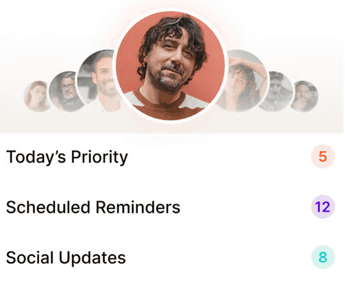
The daily priority list shows you five to eight names with a reason for each. Tap to open. Tap to send a starter message in your own voice from your own number. Done.
Best personal CRM mobile app comparison: Dex, Regards, Clay
Dex | Regards | Clay | |
Primary form factor | Desktop + browser ext. | Mobile-first | Desktop-first |
Voice capture | Not native | Native, central to product | Not native |
Business card scan | Yes (mobile) | Yes + voice note for context | Not native |
Daily priority list | Reminders, no priority engine | AI-prioritized 5-8 a day | Not the primary workflow |
Mobile UX center of gravity | Companion to desktop | Center of the product | Light, table-heavy |
Best for | MBA students, founders at a desk | Realtors, recruiters, agencies, consultants on the go | Outbound prospecting at scale |
The realtor-in-the-car test for a mobile personal CRM
If you want a one-question test for any personal CRM iPhone or Android app:
Can I, sitting in my car between showings with my hands on the wheel, dictate a follow-up note in under fifteen seconds and have it land on the right contact with the right follow-up date?
If yes, the tool will survive a busy week. If no, you'll abandon it inside a month, regardless of how good the desktop experience is.
Who needs a mobile personal CRM most
Real estate agents, brokers, and any salespeople in the field
Headhunters and executive recruiters between back-to-back calls
Marketing and consulting agency owners between client meetings
Solo consultants and freelancers who do half their work on the road
Conference attendees, BNI members, and anyone working a network
Personal CRM iPhone vs personal CRM Android: what to check before you commit
Voice capture working offline (the AI extraction can run when you're back online)
Native business card scan with OCR built in, not a webview
Push notifications for the daily priority list, not just email
Contacts sync from the phone book and from email accounts
Same data across the iOS app, Android app, and web — for sit-down review and weekly planning

Why we built Regards
I’m bad at staying in touch. Not because I don’t value people. Its a lot of work, and I didn’t have a system. This started as my fix. A quiet assistant that helped me nurture relationships thoughtfully. When people noticed the difference and asked what I was doing, it slowly evolved into a product. And the love has been incredible. Regards, Khuze

Frequently Asked Questions
Is the Regards personal CRM app on iOS and Android?
Yes. Both. Voice capture works on both.
Do I need to be online for voice notes?
Voice notes capture offline; the AI extraction runs when you're back online.
Does the mobile app handle all the work?
For most users, yes. There's also a web app for sit-down review and weekly planning.
Will my notes sync if I'm switching between phone and web?
Yes. Same account, same data.