

As a small business owner or service professional, choosing the right customer management system can make or break your growth trajectory. Whether you’re a real estate broker tracking potential buyers, a marketing agency nurturing leads, or a tax advisor building up referrals, this decision directly impacts your bottom line. You need the best way to organize your professional network and be effective at contact management.
The big question: Should you rely on your contacts app and memory, stick with spreadsheets or invest in a dedicated CRM system?
This comprehensive guide examines both options through the lens of business growth, budget constraints, and operational simplicity to help you make the right choice for 2025.
Key Takeaways: Your Quick Decision Framework
Spreadsheets Work Best For: | CRM Systems Are Essential For: |
|---|---|
✅ Contact lists under 100 | ✅ Growing databases (100+ contacts) |
✅ Solo operations | ✅ Team collaboration needs |
✅ Simple tracking requirements | ✅ Automation requirements for follow-ups |
✅ Tight budgets | ✅ Professional image and growth goals |
Spreadsheet Limitations | CRM Considerations |
❌ Error-prone manual entry | ⚠️ Don't overpay for unused features |
❌ Time-intensive manual entry | ⚠️ Prioritize mobile functionality |
❌ Poor mobile experience | ⚠️ Consider AI-powered features |
❌ Limited scalability | ⚠️ Know how to track ROI on the CRM |
Introduction: CRM and Spreadsheets in Small Business
For many small businesses, excel spreadsheet or other spreadsheet software like google sheets are the go-to tool for organizing and tracking customer data and interactions. However, as you grow and the volume of customer data increases, relying solely on manual data entry in spreadsheets can quickly become inefficient and error-prone.
This is where a Customer Relationship Management (CRM) system can make a significant difference.
What is a CRM?
Customer relationship management software is a powerful solution that helps businesses manage every aspect of their interactions with customers and prospects.
At its core, there is a centralized database where all customer data—such as contact information and previous interactions—is securely stored. The CRM system is then able to use this data to help you automate workflows, sales & marketing processes and scale your interactions while saving you time.
Why Small Businesses Start with Spreadsheets
97% of small businesses begin their customer management journey with spreadsheets—and there are compelling reasons why. Spreadsheet software like Excel and Google Sheets offer immediate accessibility, familiar interfaces, and zero additional software costs. Using a CRM Excel template provides ready-made structures for organizing contacts and sales data.
For a solo real estate agent just starting out or a small marketing agency with a handful of clients, a well-organized spreadsheet often seems like the perfect solution.
There are hundreds of free CRM templates available online; many businesses start with a free template to quickly set up their customer management system
The Rise of Google Sheets CRM Templates
Free Google Sheets CRM templates have become particularly popular among small businesses in 2025. These are often designed as a simple CRM template for ease of use and quick setup.
These CRM templates offer pre-built fields for:
Contact information and communication history
Deal stages and pipeline management
Follow-up dates and task reminders
Notes and interaction tracking
This essentially creates a basic CRM within a tool you already know how to use.
Spreadsheet Advantages for Service Businesses
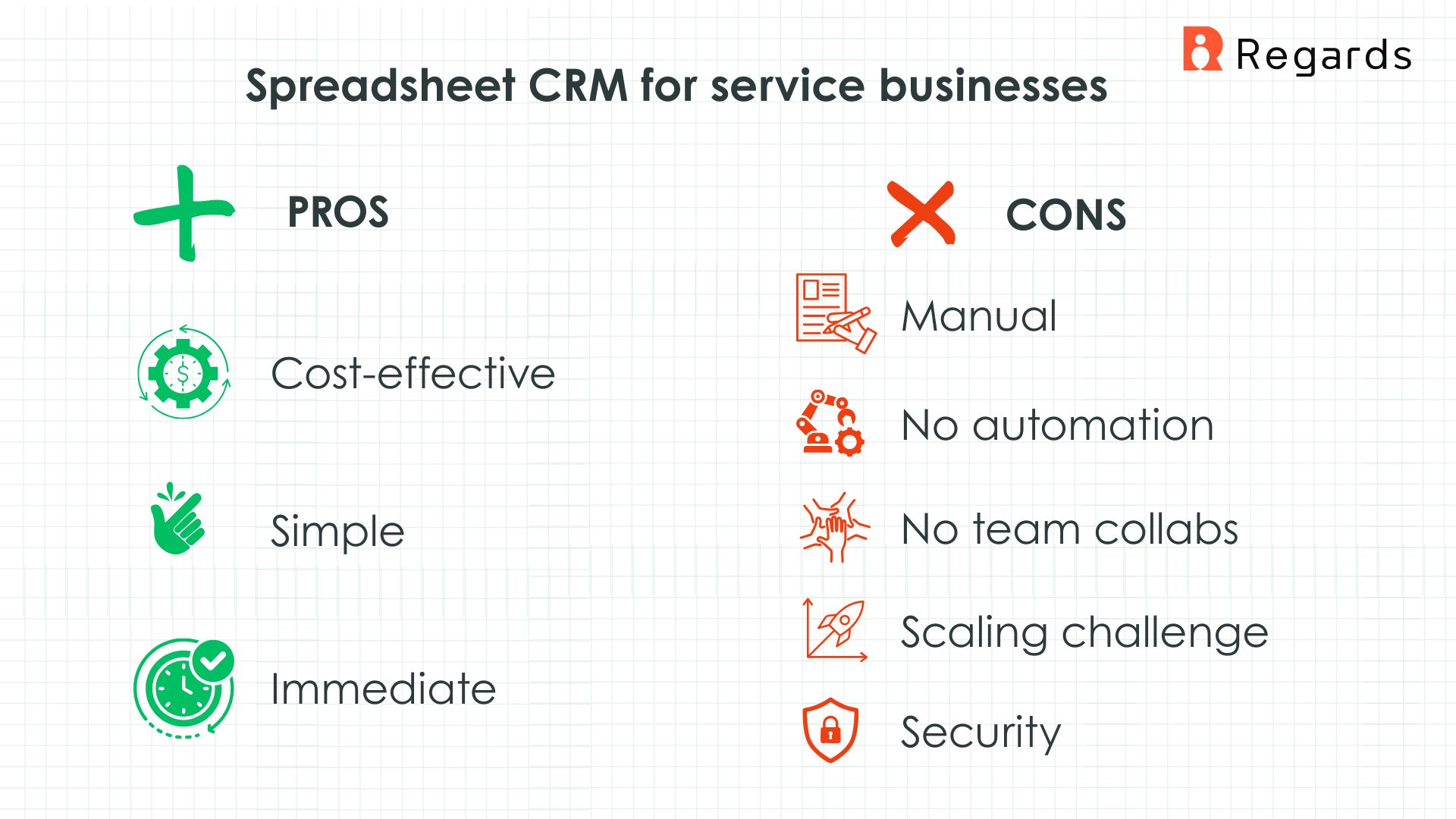
1. Cost-Effectiveness
Google Sheets: Completely free
Microsoft Excel: Often already owned
Templates: Hundreds of free CRM templates available online
ROI: Immediate value without monthly subscriptions
2. Simplicity and Complete Control
Spreadsheets offer unlimited customization without learning new software: a customizable template allows businesses to tailor their CRM to specific needs.
Marketing agencies can create columns for campaign types
Real estate brokers can track property preferences and showing dates
Tax advisors can organize client deadlines and document status
Insurance agents can monitor policy renewal dates
3. Immediate Implementation
Zero setup time required
No training period needed
No data migration headaches
Instant start: Download a template and begin organizing contacts within minutes. Some templates also include an instructions sheet to guide users through setup and customization.
Limitations of using Spreadsheets
Despite their initial appeal, spreadsheets reveal significant limitations as service businesses grow:
1. Manual Data Entry and Human Error
Every contact update, follow-up note, and status change requires manual input. For busy professionals juggling multiple transactions, this becomes increasingly time-consuming
Manually entering data is also inefficient and error-prone making it difficult to maintain accurate records as your business expands.
Real cost: A single missed follow-up can cost thousands in lost business.
2. Limited Automation Capabilities
Spreadsheets cannot automatically:
Send follow-up emails
Schedule appointments
Alert you when leads go cold
Update contact information from external sources
Generate reports and insights
Business impact: Service professionals often lose opportunities simply because they didn't respond fast enough or tasks were missed.
3. Collaboration Challenges
When teams expand, sharing and simultaneously editing spreadsheets becomes problematic:
Version control issues
Conflicting updates
Access permission problems
Difficulty in managing user access and ensure data security
Data synchronization failures
4. Scaling Difficulties
A Google Sheets CRM template that works for 50 contacts becomes unwieldy with 500:
Slow performance
Difficult information retrieval
Complex formula maintenance
Overwhelming data volume
5. Security and Compliance Risks
Spreadsheets often lack robust security features needed to safeguard sensitive business and client data:
Vulnerable to unauthorized access
Accidental sharing risks
No audit trails
Limited backup options
Compliance challenges (GDPR, CCPA, etc.)
Setting Up an Effective Spreadsheet CRM
If you’re starting with spreadsheets, here’s how to build an effective spreadsheet CRM.
Essential Columns for Service Businesses:
Contact Details: Name, address, email, phone, social media, and other relevant information
Customer Names: Full names of customers for tracking interactions and building sales history
Lead Source: How you met/found this contact
Lead Status: Categorize as cold, warm, or hot to track progress in the sales pipeline
Status/Stage: Prospect, active client, past client
Last Contact Date: When you last communicated
Next Follow-up: Scheduled next interaction
Estimated Value: Potential revenue for each deal
Sales Rep: Assigned representative for each contact
Notes: Important details and preferences
Tags/Categories: For easy filtering and grouping
Advanced Spreadsheet Features:
Conditional formatting for overdue follow-ups
Data validation for consistent entries
Pivot tables for basic reporting
Filter views for different business needs
Custom stages for the sales process
Ability to track interactions with each contact
Automated follow up reminders to ensure timely outreach
Download our free customizable Google Sheet CRM Template here. Or Read our guide to see the full list of free spreadsheet CRM templates available and to learn how to select the right one for your needs, customize it and create a simple dashboard for visualizing key metrics and trends.

CRM Advantages for Growing Service Businesses
When growing businesses outgrow basic tools like spreadsheets, dedicated CRM software becomes essential.
1. Effortless Organization for Large Contact Databases
Dedicated CRM software centralizes customer data and streamlines customer interactions, making it easier for teams to manage relationships and scale operations efficiently.
Once you exceed 100 contacts, you need:
Secure, centralized database for information storage
Advanced search capabilities for quick information retrieval
Automated reminders for important follow-ups
Smart segmentation for targeted communications
Business impact: Every missed contact is a lost opportunity. CRMs ensure no one falls through the cracks.
2. Time-Saving Automation
Modern CRMs automate routine tasks that can consume hours, ensuring that nothing falls through the cracks and your sales process remains efficient.
AI-Powered Features:
Contact enrichment: Automatically builds complete prospect profiles
Intelligent relationship tools: Provides conversation prompts and talking points
Lead scoring: Prioritizes prospects based on engagement
Email sequences: Nurtures leads without manual intervention
Social media monitoring: Tracks mentions and engagement
3. Integrated Communication & Team collaboration
Instead of switching between spreadsheets, email, and phone systems, CRMs centralize all client interactions. CRM tools also enhance collaboration by supporting the sales team in managing sales opportunities and sharing business data. This allows everyone to stay updated on deal progress and customer status.
Unified inbox for all communications
Call logging and recording
Email tracking and analytics
Calendar integration for seamless scheduling
4. Advanced Reporting and Analytics
For reporting and analytics, CRMs significantly outperform spreadsheets. They provide insights and often include a sales dashboard or contact dashboard for quick visualization of key metrics. This helps businesses make informed decisions and optimize their sales strategies for better results.
For Marketing Agencies:
Campaign performance across client lifecycle
ROI tracking by channel and campaign
Client retention and growth metrics
For Real Estate Brokers:
Lead source conversion analysis
Average deal size by property type
Market trend identification
For Service Professionals:
Client lifetime value calculations
Seasonal business pattern recognition
Referral source effectiveness
5. Professional Client Experience
CRM systems enable:
Automated appointment scheduling
Professional email templates
Consistent follow-up processes
Personalized client portals
Result: Small businesses appear larger and more organized to clients, building trust and credibility.
CRM Implementation Best Practices
Transitioning to a CRM system requires strategic planning. To ensure success, it's crucial to manage customer data effectively throughout the CRM implementation process. Here’s what to prioritize:
1. Essential CRM Features for Small Businesses
Must-Have Capabilities:
✅ Easy contact import/export from existing spreadsheets
✅ Lightweight interface (avoid paying for enterprise features you won't use)
✅ AI-powered efficiencies for automation and insights
✅ Mobile optimization for professionals on-the-go
✅ Data-driven insights for informed decision making
✅ Centralized dashboard for team collaboration
2. Implementation Timeline
Week 1: Data cleanup and preparation
Week 2: CRM selection and setup
Week 3: Data migration and testing
Week 4: Team training and workflow optimization
3. Budget Considerations
Free tiers: Start with limited features
Paid plans: Typically $15-50 per user per month
ROI timeline: Most businesses see positive returns within 3-6 months
Making the Right Choice for Your Service Business
The decision between spreadsheets and CRM isn’t just about features—it’s about matching tools to your current business stage and growth trajectory. As your business grows, you need to find the right solution to managing customer data and sales processes.
When Spreadsheets Make Perfect Sense
A Google Sheets CRM template is the right choice if you're:
✅ Solo professional with fewer than 100 contacts
✅ Just starting your service business with limited budget
✅ Comfortable with manual processes and have time for data entry
✅ Operating simple business model without complex sales processes
✅ Need basic organization without automation requirements
Success stories: Many thriving insurance agents, real estate brokers, tax advisors, and marketing agencies have built successful practices using well-maintained spreadsheets, especially in their early stages.
When CRM Investment Becomes Essential
Consider upgrading to a dedicated CRM system when you experience:
🚨 Growth beyond 100-200 contacts: Spreadsheets become unwieldy and slow
🚨 Team expansion: Multiple people need access to client information
🚨 Missed opportunities: Leads falling through cracks due to poor follow-up
🚨 Time constraints: Too much time spent on administrative tasks
🚨 Client service issues: Difficulty tracking interaction history and preferences
The Smart Hybrid Approach
Many successful service professionals use this strategic progression:
Start with Google Sheets CRM template to establish organized habits
Optimize and refine processes while business is small
Identify pain points as you grow (automation needs, collaboration, etc.)
Migrate to CRM when benefits clearly outweigh costs
Advantage: Build strong client management foundations without significant upfront investment, then scale tools as business demands increase.
ROI Analysis: Spreadsheet vs CRM
Metric | Spreadsheet | CRM System | Improvement |
|---|---|---|---|
Setup Time | 2-4 hours | 8-16 hours | Higher initial investment |
Monthly Cost | $0-15 | $15-50/user | Ongoing expense |
Lead Response Time | 2-24 hours | 5-15 minutes | 90% faster |
Follow-up Completion | 60-70% | 90-95% | 30% improvement |
Data Accuracy | 70-80% | 95-99% | 20-30% improvement |
Team Collaboration | Poor | Excellent | Significant gain |
Bottom line: Most small businesses see 3-6X ROI within the first year of CRM implementation.
By defining and tracking a structured referral relationship building process or sales process, businesses can improve conversion rates and achieve higher ROI through more closed deals.
Tools Should Serve Your Growth
Whether you choose a sophisticated CRM or start with a Google Sheets CRM template, the key is selecting tools that support rather than hinder your business growth. Ultimately, the goal is to build strong customer relationships that drive retention and satisfaction.
The most important factor isn't which tool you choose initially, but how consistently you use it to build stronger client relationships.
Key Takeaways:
Start where you are: Use what makes sense for your current situation
Stay growth-minded: Be open to evolving your approach as your business expands
Focus on consistency: Regular use trumps perfect tool selection
Measure results: Track how your chosen system impacts business outcomes
Remember: Many thriving service professionals have built successful practices starting with simple spreadsheets. The goal is progress, not perfection.

Why we built Regards
I’m bad at staying in touch. Not because I don’t value people. Its a lot of work, and I didn’t have a system. This started as my fix. A quiet assistant that helped me nurture relationships thoughtfully. When people noticed the difference and asked what I was doing, it slowly evolved into a product. And the love has been incredible. Regards, Khuze

Frequently Asked Questions
Can I use Google Sheets as a CRM for my small business?
Yes, absolutely! Google Sheets CRM templates are highly effective for small businesses, especially those just starting out. They provide essential customer relationship management functionality including contact tracking, deal stages, and follow-up scheduling. This approach is particularly suitable for solo service professionals like realtors, insurance agents or tax advisors managing fewer than 100 contacts.
What's included in a professional Google Sheets CRM template?
A comprehensive Google Sheets CRM template typically includes: Contact information columns: Name, email, phone, company details Lead tracking: Source, status, deal stage, value Activity management: Last contact date, next follow-up, interaction notes Multiple tabs: Contacts, deals pipeline, interaction history, reporting dashboard Advanced features: Conditional formatting, data validation, automated calculations
How do I access free CRM templates?
Your easiest option is to choose from our list of free templates here. Other options include selecting templates from Google sheets template gallery. Look for templates specifically designed for your industry (real estate, insurance, marketing, etc.).
Can I customize CRM templates for my specific business needs?
Absolutely! This is one of the biggest advantages of spreadsheet-based CRMs: Add/remove columns to match your workflow Create dropdown menus for consistent data entry Implement conditional formatting for visual cues Build custom formulas for calculations and automation Design multiple views for different business functions
What key metrics should I track in my CRM dashboard?
Essential metrics for small businesses: Sales Performance: Lead conversion rates by source, Average deal size and sales cycle length, Monthly/quarterly revenue trends Customer Relationship: Customer retention and churn rates, Client lifetime value, Referral source effectiveness Operational Efficiency: Follow-up completion rates, Response time averages, Pipeline velocity
Can Google Sheets integrate with other business tools?
Yes, but with limitations: Available integrations: Google Workspace: Gmail, Calendar, Drive Zapier: Connect to 3,000+ apps Add-ons: Email marketing, scheduling tools APIs: Custom integrations for tech-savvy users Important note: These integrations often require technical setup and may not be as seamless as dedicated CRM integrations.
When exactly should I upgrade from spreadsheets to a CRM?
You should likely upgrade to a CRM tool if you: i) have 100+ contacts in your database ii) Have multiple team members needing access iii) Spend 2+ hours daily on manual data entry iv) Don’t know how many follow-ups are missed
What are the best free CRM alternatives to Google Sheets?
Top free CRM options for 2025 include Relationship & network management: Regards AI Sales & lead tracking: HubSpot CRM, Zoho CRM
How do I successfully migrate from Google Sheets to a CRM?
Prepare by cleaning up existing data (remove duplicates, standardize formats), fill in missing information and export data as CSV file. Then import CSV data using platform's import tool. Set up automation rules and workflows, Customize fields and stages for your business and train team members on new system
What's the biggest disadvantage of using spreadsheets for CRM?
The automation gap is the most significant limitation. Spreadsheets require manual data entry for every interaction, follow-up, and status update. This becomes increasingly time-consuming and error-prone as your client base grows. Real business impact: Insurance agents miss policy renewal opportunities Real estate brokers lose touch with potential buyers Service professionals forget important follow-ups Result: Lost revenue and damaged client relationships
How much does a small business CRM typically cost in 2025?
Free tiers: $0 (with significant limitations) Basic plans: $15-30 per user per month Professional plans: $30-60 per user per month Enterprise plans: $60+ per user per month
What's the typical ROI for upgrading to a paid CRM system?
Average ROI is 4-6X within first year between increased revenue, time savings and risk reduction. Real example: A tax advisor with 200 clients investing $50/month in CRM typically sees $200-300 monthly return through improved efficiency and client retention