
If you’ve been reading tech blogs recently, you’ve probably seen the phrase “personal CRM” show up more than it used to. It sounds like a lot of things — a Rolodex, a contacts app, a weird mini version of Salesforce, a networking app. The truth is a bit simpler than that.
Here’s what a personal CRM actually is, what it isn’t, and why the category exists in the first place.
Key takeaways
|
The simple definition
A personal CRM is a tool built to help one person manage and nurture their own professional and personal relationships — not a sales team’s deal pipeline. It keeps every contact, conversation, and follow-up in one place, so the people you want to stay close to don’t quietly drift off your radar.
Where a traditional CRM asks “where is this deal in the pipeline?”, a personal CRM asks “who in my network haven’t I spoken to recently?” and then helps you do something about it.
“Your network is your destiny, a reality backed up by many studies in social networking theory. We are the people we interact with.” — Keith Ferrazzi, Never Eat Alone |
Why the category exists
Most of us have thousands of contacts spread across LinkedIn, our phone, Gmail, WhatsApp, business cards in a drawer, and a half-built spreadsheet from 2021. We know relationships matter. We know follow-ups matter. We just can’t hold all of it in our heads.
82% of small businesses say referrals are their primary source of new business. Source: DemandSage, 2026 |
65% of revenue for small businesses comes from referral business. Source: Nielsen Global Trust Index |
Most of the software we have was built for sales teams. A personal CRM is the category that finally exists for the other person — the individual, with their own network, trying to stay in touch better.
What it actually does (in plain language)
A personal CRM does four things, all of them boring, all of them incredibly useful when done consistently.
1. Keeps all your contacts in one place
Imports from your phone, LinkedIn, Gmail, or a spreadsheet. Lets you add new ones with a scan of a business card. Crucially, it lets you attach context — a job title, a tag, a company, a note about what you talked about — so you don’t just have a pile of names.
2. Logs what you talked about
After every meaningful conversation, you (or AI, from a voice note) log what was said. Next time you reach out, you know exactly where you left off. “How did the Berlin trip go?” beats “how have you been?” every time.
3. Reminds you to follow up
The whole game is follow-through. A personal CRM schedules the next touchpoint automatically, based on cadence or natural signals (job changes, posts, birthdays), and surfaces a short list each week of who to reach out to.
4. Helps you reach out with context
Instead of staring at a blank message box, you see your last conversation, a recent post they made, a reason that reaching out now makes sense. Writing becomes fast. Outreach starts feeling personal rather than performative.
A quick story: how Keith Ferrazzi built his network
Keith Ferrazzi grew up in a small Pennsylvania steel town. His father was a steelworker. His family had no connections, no alumni network, no inherited social capital. What Keith did have was a father who told him, repeatedly, that the only way out was through people.
Ferrazzi turned relationship-building into a life discipline. He earned a scholarship to Yale, then Harvard Business School, then became the youngest-ever CMO of a Fortune 500 company at age 32. He built a personal network of over 10,000 people — not by schmoozing, but by making it his mission to help everyone he met.
The core argument of his book, Never Eat Alone, is simple: the rich get richer partly because they have well-connected people around them. Anyone can build that. But it requires intention. A personal CRM is the modern tool that turns that intention into a habit.
Personal CRM vs. traditional CRM
These get confused constantly. They look similar at a glance. In practice, they solve very different problems.
Focus
Personal CRM: Long-term relationships and context
Traditional CRM: Short-term deal pipelines and forecasts
User
Personal CRM: One individual, managing their own network
Traditional CRM: A sales team, often with a dedicated admin
Complexity
Personal CRM: Mobile-first, usable in under a minute
Traditional CRM: Desktop-first, feature-heavy, often needs training
What you get out
Personal CRM: Warmer network, more referrals, fewer awkward re-engagements
Traditional CRM: Pipeline reports, close rates, revenue forecast
“It’s better to be the best connected than the most connected.” — Reid Hoffman, co-founder of LinkedIn |
Who should use a personal CRM?
The category started as a niche tool for networkers. In 2026, it’s useful for a much wider group.
Freelancers and consultants
Your pipeline is your past clients and the warm network around them. A personal CRM keeps that pipeline alive in the background.
Agency owners and small business owners
Almost all new business in services comes from past clients, referrers, and partners. A personal CRM is the tool that makes sure those relationships stay warm.
Founders
Investors, advisors, design partners, early hires, future hires — the people around a company are as important as the product. A personal CRM keeps you close to them without spinning up a full sales stack.
Executive recruiters and agents
The ATS tracks mandates. A personal CRM handles the long, slow relationship layer that creates the next mandate.
Professionals managing a career
Mentors, former colleagues, recruiters, bosses. Most career-changing opportunities come from someone you already know. A personal CRM keeps that someone-already-know layer active.
Anyone who wants to be better at staying in touch
Some people just want to remember their friend’s kid has a recital next week. That’s a perfectly good reason too.
What “using” a personal CRM actually looks like
It’s less dramatic than you’d think.
The weekly 30-minute habit Open your personal CRM. Look at who’s overdue for a touchpoint. Send 3–5 messages: an article, a congrats, a catch-up, a re-engagement. Follow up on any promise from last week (send the thing, make the intro). Add any new contacts from the week. Log one personal and one professional detail each. Optional: make one introduction between two people who should know each other. |
Over a year, that’s roughly 150 meaningful touchpoints. 150 moments where someone felt considered. That’s the entire secret.
“Follow up or fail. When you meet someone you want to know better, take the extra step to ensure you won’t be lost in their mental attic.” — Keith Ferrazzi, Never Eat Alone |
The give-first principle (and why it changes everything)
The single biggest mistake people make with a personal CRM is using it like a sales CRM — tracking people for what they can do for you. The best networkers flip this: they track people for what they can do for them.
Adam Grant’s research across 30,000 professionals showed that the most successful people in nearly every field are the most consistently generous ones. Not naive givers — strategic, boundaried givers. Takers dominate the short term. Givers, with good boundaries, dominate the long term.
A personal CRM used well becomes a giving engine. You see who’s overdue for a check-in. You notice a recent post you can share. You spot two contacts who should know each other. You spend five minutes making someone else’s day a bit better. Repeat, consistently, over years.
How is it different from a contacts app or a notebook?
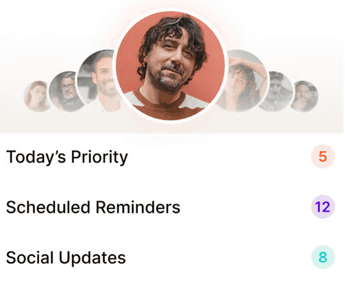
A contacts app stores who people are. A notebook stores what you remember. A personal CRM does both, plus:
Scheduled reminders so the right person surfaces at the right time
Interaction history you can scan in seconds before a call
Signals (job changes, posts, anniversaries) that suggest natural reasons to reach out
AI-assisted capture: scan a card, speak a note, and the system handles the entry
None of this is rocket science. It’s just the right information, at the right time, without you having to remember it.
Is a personal CRM worth it?
It depends on what your work is built on. If your revenue, career, or business comes through relationships — clients, referrals, introductions, repeat business — then almost certainly yes. For most professionals in 2026, it’s one of the highest-ROI tools in the stack, and one of the cheapest.
If your work is purely transactional, or you already have a well-oiled assistant doing this for you, maybe not. Everyone else: probably yes.
Regards is a personal CRM built for how you actually work
Regards is a mobile-first personal CRM designed for professionals whose revenue depends on relationships — consultants, agencies, recruiters, real estate agents, founders, and anyone in between. Scan a business card, leave a voice note, and the AI handles the admin. Every week, Regards hands you a short list of 5–8 people to reach out to, with context and suggested conversation starters. You send the message. The system carries the rest. Try it at regardsapp.ai

Why we built Regards
I’m bad at staying in touch. Not because I don’t value people. Its a lot of work, and I didn’t have a system. This started as my fix. A quiet assistant that helped me nurture relationships thoughtfully. When people noticed the difference and asked what I was doing, it slowly evolved into a product. And the love has been incredible. Regards, Khuze

Frequently Asked Questions
What is a personal CRM used for?
A personal CRM is used to manage and nurture your professional and personal relationships. It centralises contacts, logs your interactions, sets follow-up reminders, and gives you context before every conversation — so you stay in touch consistently without trying to remember everything.
How is a personal CRM different from a traditional CRM?
A personal CRM is built for one person managing their own relationships. A traditional CRM is built for a sales team managing a shared pipeline. Different user, different unit of work (a relationship vs. a deal), different cadence, different metrics.
Who should use a personal CRM?
Anyone whose career or business depends on relationships: freelancers, consultants, agencies, recruiters, real estate agents, founders, and professionals rebuilding or growing a network. Also useful for anyone who simply wants to be better at staying in touch.
Can a personal CRM replace a spreadsheet?
Yes. Spreadsheets break down once you get past a few hundred contacts, and they can’t send reminders, surface signals, or hold structured interaction history. A personal CRM does all of that with none of the maintenance overhead.
Are personal CRMs easy to use?
The good ones are designed to be used in under a minute on mobile. If the one you’re looking at feels heavy or requires admin work to set up, you’re probably looking at a sales CRM in disguise — not a personal CRM.